
The Complete Guide to Split Ergonomic Keyboards
Quick answer:
A split ergonomic keyboard is a keyboard divided into two independent halves that you position at shoulder width, reducing the wrist and shoulder strain that standard keyboards cause.
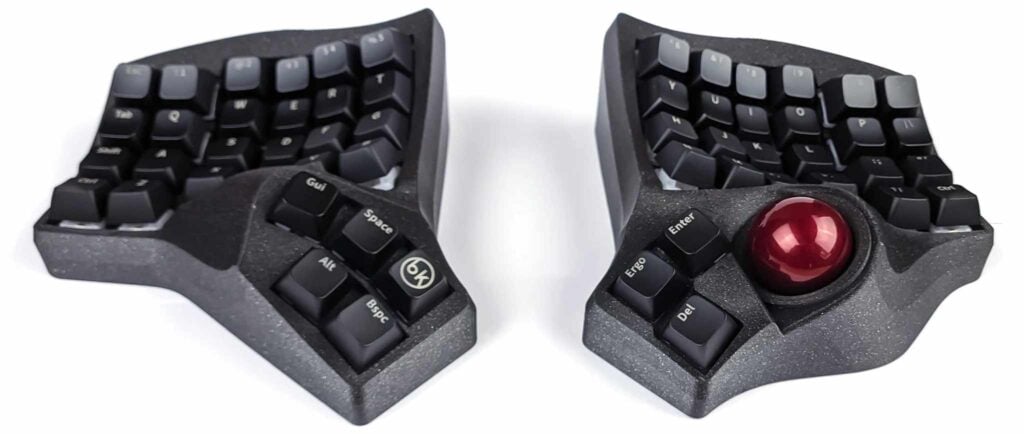
The most advanced models include an integrated trackball or trackpad, so you don’t need a separate mouse.
Introduction
If you spend most of your day typing, your keyboard is slowly making things worse. Wrist pain, shoulder tightness, forearm fatigue — these aren’t just occupational hazards. They’re what happens when you use a 150-year-old typewriter design for eight hours a day. The original layout was built to prevent mechanical jams. Nobody was thinking about your tendons.
Split ergonomic keyboards exist to fix this. They’ve been adopted by programmers, writers, and people who realized that typing shouldn’t hurt.
This guide covers what they are, how they differ, which features actually matter, and which one to buy — whether you’ve never heard of split keyboards or you’ve already spent two hours on Reddit comparing keywell depths.
What Is a Split Ergonomic Keyboard and how does it help?
A split ergonomic keyboard separates into two independent halves, each positioned to match your shoulder width and natural arm position.
Wrist rotation
The split removes the inward wrist rotation — called ulnar deviation — that a standard keyboard forces on both hands. With a standard keyboard, your wrists have to bend outward to reach the keys while your elbows stay at your sides. Over hours and years, that constant deviation is one of the main contributors to carpal tunnel syndrome, tendinitis, and chronic wrist pain.
A split keyboard removes that constraint. Each half sits where your hand naturally rests.
Pronation
Some split keyboards also address pronation. When your forearms rest flat on a desk, they’re rotated inward from their natural position. Tenting — tilting the inner edge of each half upward — brings the keyboard closer to a handshake position, which is the forearm’s natural resting angle. Tenting at 30 degrees measurably improves wrist comfort.
Columnar stagger
Another common improvement is the columnar layout. Standard keyboards use staggered rows — each row offset from the one below — a design inherited from typewriter mechanics with no ergonomic basis.
Columnar layouts arrange keys in straight vertical columns, matching the natural straight-down movement of each finger. Less lateral movement, less reaching.
Concave keywell
Split positioning, tenting, and columnar layout are the foundation of ergonomic keyboard design. The best keyboards add a fourth element: a concave keywell, which curves the key surface into a bowl shape that follows the arc of your fingertips, so your fingers barely have to move at all.

Who Should Use a Split Ergonomic Keyboard?
The honest answer: anyone who types a lot and wants to stop having hand pain. More specifically — if you type several hours a day, have wrist or shoulder pain you suspect is keyboard-related, or have already tried a gel wrist rest and found it doesn’t actually help, a split keyboard is worth serious consideration.
One caveat: the learning curve is real. The first two weeks on a columnar layout will feel disorienting, especially if you’ve typed on standard staggered keyboards your whole life.
Most people return to their normal speed within a month.
The Types of Split Ergonomic Keyboards
Not all split keyboards are the same. The category spans a wide range of designs.
Flat split keyboards
A flat split keyboard divides a standard key layout into two halves with a flat surface, usually in a columnar arrangement. This is the most common and affordable type. Examples include the ZSA Moonlander, Ergodox EZ, Splitkb Elora and Kyria, and Dygma Defy.
Flat split keyboards are a genuine improvement over standard keyboards and a reasonable first step. Their main limitation is that a flat surface still forces the forearms into pronation. Tenting accessories help, but they’re a workaround for a problem that sculpted keyboards solve by design.
Sculpted and concave keywell keyboards
A sculpted split keyboard adds a three-dimensional key arrangement — keys at different heights and angles to match the natural resting position of each finger. Shorter fingers reach shallower keys, longer fingers reach deeper keys, with minimal movement required.
This is the biggest reduction in typing fatigue available in keyboard design, and it’s the feature that most separates serious ergonomic keyboards from everything else.
Examples include the Scylla and Charybdis from Bastard Keyboards, the Dactyl Manuform, the Moergo Glove80, and the Kinesis Advantage360.

Split keyboards with a trackball
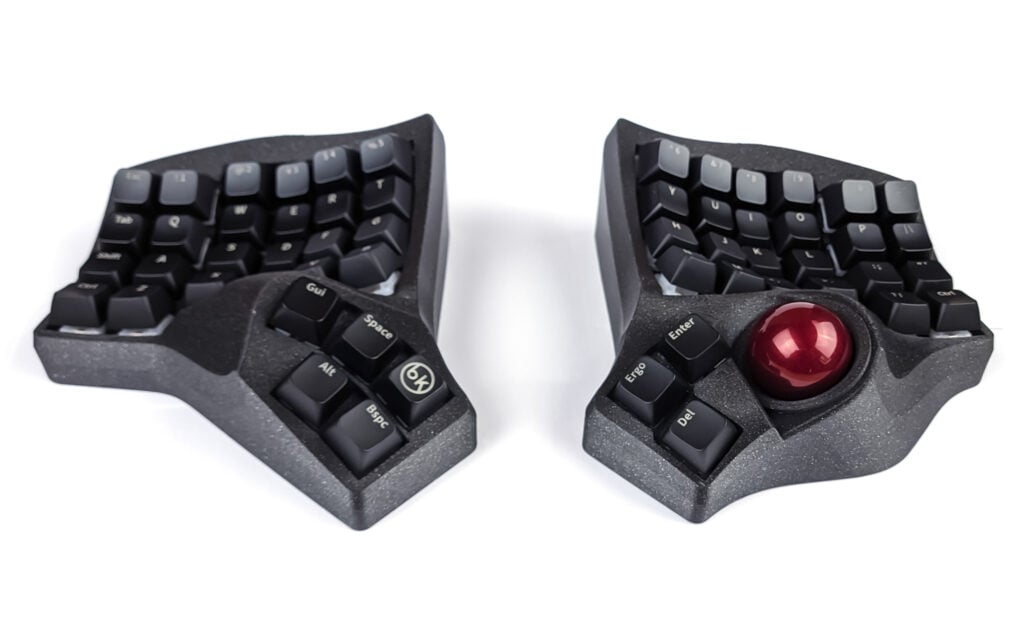
A split keyboard with an integrated trackball places a physical ball under the thumb of one half, giving you full cursor control — clicking, scrolling, dragging — without moving your hand from the typing position.
This is the most overlooked upgrade in ergonomic setups. A perfectly positioned keyboard still requires constant arm movement if you need a separate mouse. A thumb trackball closes that gap.
For programmers and writers who switch frequently between keyboard and cursor tasks, this changes the experience more than almost any other single feature.
The Charybdis is the best example: sculpted, tented, with a purpose-designed thumb trackball, available prebuilt.

Split keyboards with a trackpad
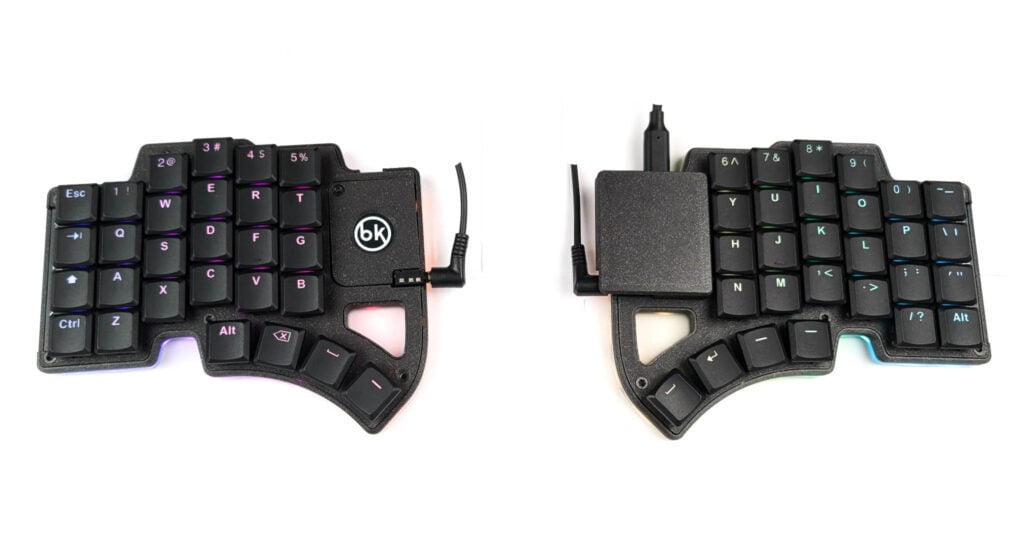
A trackpad-equipped split keyboard offers touch-based control instead of a physical trackball. Trackpads suit gesture-based navigation — swiping between windows, scrolling through documents — and work particularly well for laptop users already comfortable with trackpad gestures.
The Dilemma MAX by Bastard Keyboards is the leading option here: a compact, hotswap split keyboard with an integrated trackpad, built for portability and travel.
Features That Matter When Choosing a Split Ergonomic Keyboard
Key count
More keys means a shorter adjustment period — you keep your number row, familiar modifier positions, everything close to what you already know. A 56-key board is the right starting point for most people.
Fewer keys means a more efficient layout once you’ve adapted, since every key is reachable from the home row without stretching. A 35-key board is for experienced users already comfortable with layers and homerow mods.

Columnar vs. staggered layout
Columnar layouts align each column vertically, matching straight finger movement.
Staggered layouts offset each row — a typewriter legacy with no ergonomic value. For ergonomic use, columnar is better.
The adjustment from staggered to columnar is the main thing that takes time when switching.
All Bastard Keyboards use a columnar layout.
Concave vs. flat keywell
Flat is more common and cheaper to manufacture, and already helps a lot compared to a standard keyboard.
Concave is meaningfully better for typing fatigue over long sessions. If you’re going to use this keyboard for years, the concave keywell is worth it.
Integrated pointing device
If you use a mouse heavily throughout the day, an integrated pointing device is the most impactful upgrade you can make.
Trackball for precision work and full mouse replacement.
Trackpad for gesture-based navigation and everyday tasks.

Firmware
QMK is the open-source standard. It supports full key remapping, layers, macros, and pointing device configuration.
VIA provides a graphical interface for QMK that requires no coding — you remap keys in a browser.
Avoid keyboards with proprietary firmware that can’t be customized or updated independently.
Prebuilt vs. DIY
DIY kits require soldering, sourcing components, and configuring firmware — typically 10 to 20 hours of work. The result is a keyboard you understand deeply and can modify freely.
Prebuilt keyboards arrive assembled and tested, ready to use.
If you want to build, build. If you want to type, buy prebuilt.
Warranty and support
Most custom keyboards have no warranty and no support. For something you’ll use eight hours a day, that’s a real consideration.
Bastard Keyboards offers a 3-year warranty on all products, ships spare parts in every box, and provides support by email and Discord.
Trackpad or Trackball?
The deciding question is simple: do you primarily navigate and scroll, or do you primarily point and click with precision?
If your cursor use is mostly swiping between windows, scrolling through documents, and general navigation — especially if you work across multiple machines or travel — a trackpad is probably right for you. The Dilemma and Dilemma MAX are built for that workflow.
If you want a complete mouse replacement with precise cursor control and spend most of your time at a fixed desk, a trackball keyboard like the Charybdis is likely the better fit.
Split Ergonomic Keyboards Compared
| Keyboard | Type | Keys | Pointing device | Prebuilt | Warranty | Best for |
|---|---|---|---|---|---|---|
| Charybdis MK2 | Sculpted + tented | 56 | ✅ Trackball | Yes | 3 years | Best overall |
| Charybdis Mini | Sculpted + tented | 41 | ✅ Trackball | Yes | 3 years | Compact, layer users |
| Charybdis Nano | Sculpted + tented | 35 | ✅ Trackball | Yes | 3 years | Power users |
| Dilemma MAX | Flat | 56 | ✅ Trackpad | Yes | 3 years | Travel, laptop users |
| Dilemma | Flat | 36 | ✅ Trackpad | Yes | 3 years | Travel, laptop users |
| Scylla | Sculpted + tented | 58 | ❌ None | Yes | 3 years | Typers and coders |
| TBK Mini | Sculpted + tented | 42 | ❌ None | Yes | 3 years | Typers and coders |
| Skeletyl | Sculpted + tented | 36 | ❌ None | Yes | 3 years | Typers and coders |
| ZSA Voyager | Flat | 72 | ❌ None | Yes | 2 years | |
| Ergodox EZ | Flat | 76 | ❌ None | Yes | 2 years | |
| Kinesis Advantage360 | Sculpted + tented | 54 | ❌ None | Yes | 2 years | |
| Dactyl Manuform | Sculpted + tented | 60+ | ❌ None | No | None | Advanced DIY builders |
Which Split Ergonomic Keyboard Should You Buy?
Charybdis MK2 — Best Overall
The Charybdis MK2 is the keyboard most people on this page are looking for. It’s the only prebuilt in this category that combines a concave keywell with an integrated thumb trackball — and those two features together are what actually make the difference between a keyboard that helps and one that transforms how your workday feels.
56 keys keeps the learning curve manageable. The trackball sits under your thumb, not off to the side. The keywell curves to follow your fingers rather than asking them to flatten toward it. Prebuilt, tested, 3-year warranty.
Dilemma MAX – for beginners and laptop users
If you travel frequently or work primarily from a laptop, the Dilemma MAX is the practical choice. It’s compact, hotswap, and the integrated trackpad means you’re not dragging a mouse through airport security.
The 56-key layout keeps the adjustment period short — you keep your number row, you keep your modifier positions. The firmware is QMK with VIA support, so it’s fully configurable in a browser, or with coding when you’re ready to dig in.
Frequently Asked Questions
Yes. Split keyboards measurably reduce ulnar deviation – the outward wrist bend that standard keyboards force.
A split columnar keyboard with moderate tenting addresses the three primary mechanical causes of keyboard-related RSI: ulnar deviation, forearm pronation, and excessive finger travel.
Most users return to their previous typing speed within two to six weeks.
The main adjustment is to the columnar layout, and the physical split. Starting with a higher key count board – 56 keys – significantly shortens the adaptation period by keeping familiar key positions close to where you expect them.
Not if the keyboard includes an integrated pointing device.
The Charybdis series includes a thumb trackball and functions as a complete mouse replacement.
The Dilemma series includes a trackpad and is great for light tasks and browsing.
Standard split keyboards without pointing devices still require a mouse – which can reintroduce shoulder and arm strain that the keyboard is designed to prevent.
A trackball keyboard uses a physical ball rolled by the thumb for precise cursor movement – equivalent to a mouse in functionality, better in ergonomics. The Charybdis is designed as a full mouse replacement.
A trackpad keyboard uses a touch surface for gesture-based control – closer to a laptop trackpad.
Trackball for precision and full mouse replacement; trackpad for gestures, scrolling, and portability.
The most common adjustment period is 2–6 weeks.
Most people find their speed returns to baseline within a month, and many exceed their previous speed within a couple months.
The Charybdis MK2 (56 keys) is the best option for full ergonomics – it keeps a full number row and familiar key positions, which shortens the adjustment period significantly.
If you still want ergonomics but want something more familiar, the Dilemma MAX is what you’re looking for.
The Dactyl Manuform is an open-source sculpted keyboard design popular in the DIY community. It shares concave keywell geometry with the Charybdis.
Key differences:
- the Charybdis has an integrated trackball
- a maintained QMK firmware
- prebuilt option
- 3-year warranty
- discord community
The Dactyl Manuform is DIY-only, has no official trackball integration, no warranty, and no dedicated support.
All Charybdis and Dactyl keyboards are compatible with MX-format switches including Cherry, Gateron, Kailh, Boba, Zealios, and others. They are not compatible with low-profile switches (Kailh Choc V1/V2 or MX low profile).
The Dilemma series supports hotswap Choc V1, meaning switches can be changed without soldering.
Yes. The concave keywell minimizes finger travel during long coding sessions. The thumb trackball allows switching between keyboard and cursor without hand movement. The QMK firmware supports complex layers, macros, tap dances, etc.
Can I get a split keyboard already assembled?
Yes, Bastard Keyboards offer split keyboards fully assembled.
They arrive fully assembled and tested, with cables and spare parts included. Estimated lead times are listed on each product page. Bastard Keyboards ships internationally from the Netherlands, with EU delivery in 2–4 days and international shipping (US, Japan) in approximately 5–10 days.
Conclusion
Standard keyboards are a typewriter design being used for a task typewriters were never meant for. Split ergonomic keyboards fix the postural problems that cause desk-related RSI — and the best ones remove the mouse from the equation at the same time.
For most people: the Charybdis MK2. For travel and laptop workflows: the Dilemma MAX.
If you want a flatter starting point before committing to a sculpted keywell, the ZSA Voyager, SplitKB Elora, and Dygma Defy are all worth considering.
The adjustment takes two to four weeks. After that you stop noticing it — except when you have to use someone else’s keyboard.