
Split Keyboard with Trackpad: The Complete Guide
Quick answer:
A split keyboard with a trackpad is a split ergonomic keyboard with a built-in touch-sensitive surface that replaces the mouse through gesture-based control – scrolling, clicking, swiping – without moving your hands from the typing position.
The Dilemma and Dilemma MAX by Bastard Keyboards are the leading split keyboard with an integrated trackpad, available prebuilt with a 3-year warranty and hotswap switches.
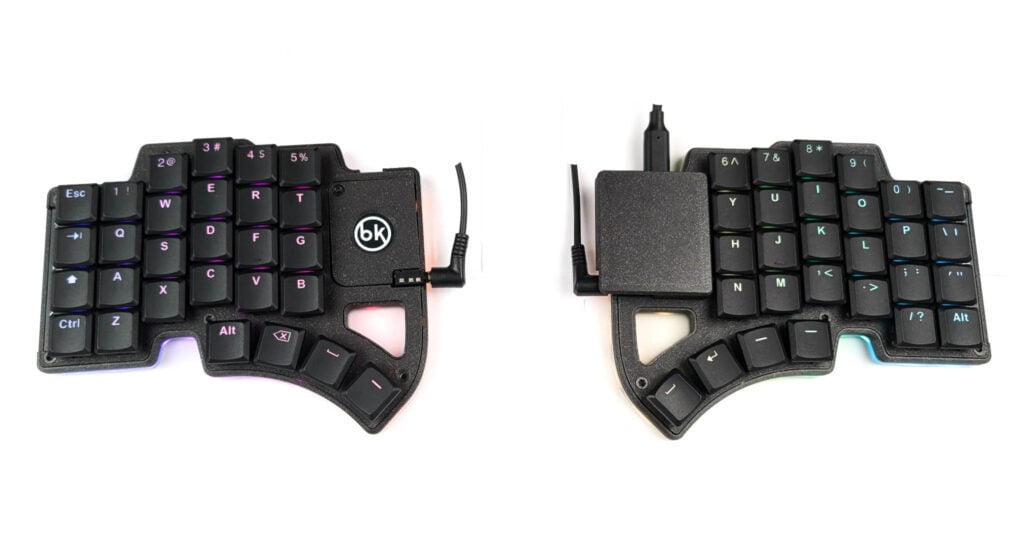
Why your keyboard and mouse setup is working against you
If you’ve ever ended a workday with a sore shoulder, stiff wrists, or a vague ache from reaching sideways for your mouse all day, you already understand the problem.
Standard keyboard and mouse setups were not designed with your body in mind.
A split ergonomic keyboard with an integrated trackpad solves this in one move: the keyboard sits at shoulder width so your arms stop crossing inward, and the trackpad is close to your index and middle finger, for minimal hand movement when you want to use it.
No more hunting for the mouse. No more reaching. Just uninterrupted work, with your hands where they naturally rest.
This guide covers what to look for, compares the best split keyboards with integrated trackpads available today, and gives a clear recommendation — whether you’re new to ergonomic keyboards or already deep in the rabbit hole.
What Is a Split Ergonomic Keyboard with a Trackpad?
A split ergonomic keyboard with a trackpad is a keyboard divided into two independent halves positioned at shoulder width, with a built-in trackpad on one half for mouse control.
The trackpad is typically placed under the index and middle fingers on one half, allowing full cursor control — clicking, scrolling, dragging — with minimal movement of your hands from the typing position.
This type of keyboard addresses the two main causes of desk-related repetitive strain injury: the forced inward rotation of the wrists from a standard keyboard, and the constant arm movement required to reach a separate mouse.
A trackpad on a keyboard is great for everyday tasks: browsing, simple softwares. For more advanced usecases, it might not be enough – then, you should look into a trackball keyboard.
Who Should Use a Split Keyboard with a Trackpad?
You are a strong fit if:
- you use a laptop a as your primary work machine and are used to trackpad gestures ( two-finger scrolling, click…),
- you travel frequently and want a compact keyboard without sacrificing input ergonomics
- you are a writer, analyst, coder that use the mouse to navigate and scroll, not for precision work
You are not a strong fit if:
- you are a designer, illustrator, or video editor who needs precise pixel-level cursor control — a trackball keyboard like the Charybdis is a better fit for that workflow
- you want a sculpted concave keywell, which trackpad
How a Split Keyboard with an Integrated Trackpad Works
The trackpad replaces your mouse entirely
The trackpad on the Dilemma and Dilemma MAX sits on the right half of the keyboard, positioned so it is reachable from the home row with minimal wrist movement. It supports the same gestures you already use on a laptop: scrolling, left and right click, swiping – there is no learning curve.
Instead of your trackpad being fixed to the center of a laptop that forces your posture, it is now part of a keyboard that sits at shoulder width. Your hands are in a neutral position while you use it. The reach disappears.
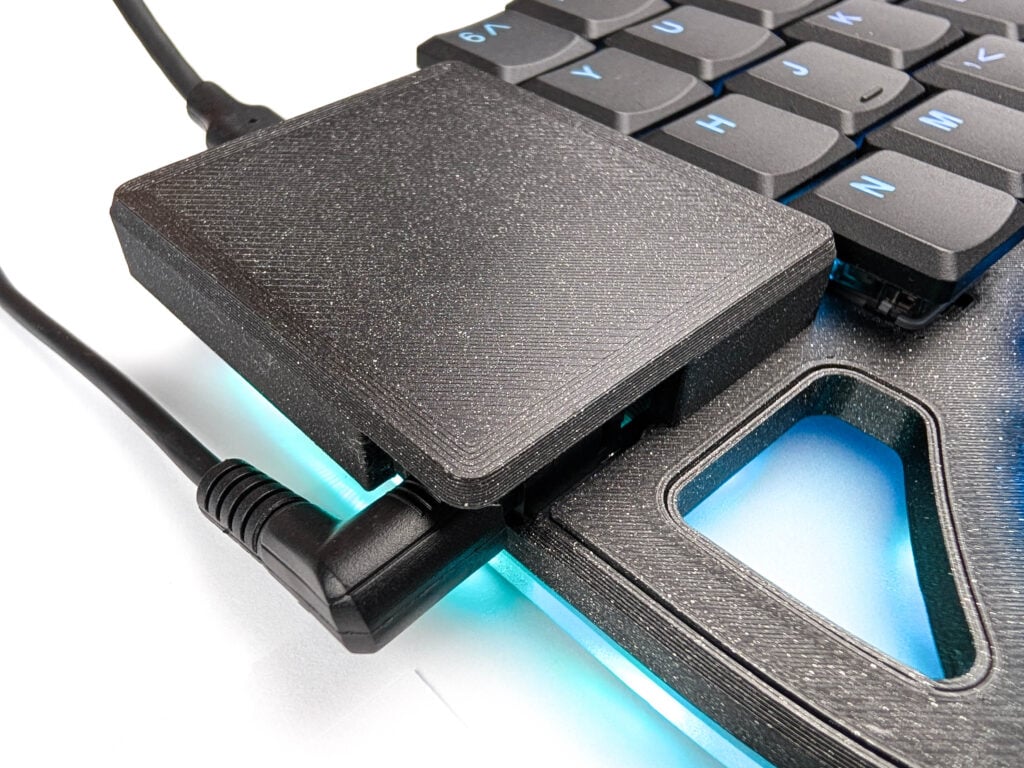
Hotswap switches – change your feel without soldering
Both the Dilemma and Dilemma MAX use hotswap Choc V1 sockets. Hotswap means the switches — the mechanical components under each key that determine how the keyboard feels and sounds — can be removed and replaced by hand, without soldering, in seconds. You pull the old switch out with a switch puller and press the new one in.
This matters particularly for people coming from a laptop keyboard, where the switch feel is fixed and non-negotiable. With a hotswap keyboard, you can start with whatever switches the keyboard ships with, type on them for a few weeks, and swap to something lighter, heavier, quieter, or clickier based on what you actually prefer. It removes one of the biggest sources of buyer uncertainty in mechanical keyboards.
The Dilemma and Dilemma MAX are compatible with all Choc V1 switches.
QMK firmware and VIA – as much control as you need
QMK is the open-source firmware standard for custom keyboards. It gives you full control over every key: layers, macros, trackball DPI, scroll behavior, RGB, and more.
VIA is a graphical interface on top of QMK that lets you remap keys without touching any code, directly in a browser. If you’re not a programmer, VIA is all you’ll need. If you are, QMK gives you essentially unlimited customization.

Key count: how much relearning are you willing to do?
Split trackpad keyboards can have a large range of keys.
More keys means a gentler learning curve — you keep your number row, you keep familiar modifier positions.
Fewer keys means a more efficient layout once you’ve adapted, since everything lives within reach of the home row.
The Dilemma MAX is the right starting point for most people. The smaller Dilemma is for power users who already use layers and homerow mods.
The Dilemma and Dilemma MAX keyboards also use a columnar layout — each column runs in a straight vertical line — rather than the staggered rows of a standard keyboard. This matches the natural straight-down movement of your fingers instead of the awkward diagonal reach that standard layouts require.
Warranty and support: often an afterthought
Most custom keyboards have no warranty, no spare parts, and no support structure.
For something you’ll use eight hours a day, that’s a real risk. Look for at least a 2-year warranty, access to spare parts, and a support channel staffed by people who actually know the product.
At Bastard Keyboards, we offer an extensive 3 year warranty, with online support through emails and discord. We also offer spare parts, and the schematics.
Dilemma vs. Dilemma MAX: Which One Should You Buy?
Dilemma MAX – Best Overall
The Dilemma MAX is the right choice for most people. Its 56-key layout includes a number row and familiar modifier positions, which means the adjustment period when switching from a standard keyboard is measured in weeks rather than months.
If you have never used a keyboard with layers, a 40% layout, or homerow mods, start here. The learning curve is manageable and the full key count means you are never hunting for a key that has been moved to a layer you haven’t memorized yet.
Dilemma – For power users
The Dilemma is the right choice if you are already comfortable with compact layouts, homerow mods and layers. Or if you are willing to learn them.
Its 36-key layout is smaller, lighter, and more portable – genuinely fits in a jacket pocket – and it is the more efficient setup once you have adapted to it.
If you already use a small keyboard, or if you use homerow mods and are comfortable with a three-row layout, the Dilemma will feel natural within a few days.

Full specification and comparison
| Spec | Dilemma | Dilemma MAX |
|---|---|---|
| Keys | 36 | 56 |
| Layout | 3×5 + 3 thumb | 4×6 + 5 thumb |
| Number row | No | Yes |
| Best for | Experienced users | Beginners |
| Switch type | Hotswap Choc V1 | Hotswap Choc V1 |
| Trackpad | Integrated | Integrated |
| Connectivity | USB-C + TRRS | USB-C + TRRS |
| Firmware | QMK / VIA | QMK / VIA |
| OS compatibility | Windows, macOS, Linux, Android | Windows, macOS, Linux, Android |
| Warranty | 3 years | 3 years |
| Origin | Dordrecht, Netherlands | Dordrecht, Netherlands |
| Open-source | Yes — hardware and firmware | Yes — hardware and firmware |
| Available as | Prebuilt | Prebuilt |
Frequently Asked Questions
A split keyboard with a trackpad is a split ergonomic keyboard with a built-in touch-sensitive surface that provides gesture-based cursor control – scrolling, clicking, and window navigation – without a separate mouse.
The two halves sit at shoulder width for ergonomic positioning, and the trackpad is integrated into one half within reach of the home row. The Dilemma and Dilemma MAX by Bastard Keyboards are the leading prebuilt options in this category.
The Dilemma V3 has 36 keys and is designed for experienced users comfortable with layers and homerow mods.
The Dilemma MAX has 56 keys including a number row, making it more accessible for people new to compact ergonomic keyboards.
Both include an integrated trackpad, hotswap Choc switches, QMK/VIA firmware, and a 3-year warranty.
If you are unsure which to choose, start with the Dilemma MAX.
For most simple workflows, yes. Scrolling, clicking, two-finger navigation, and window switching are all handled by the integrated trackpad.
For writing, coding, browsing, and general office work, the Dilemma and Dilemma MAX function as a complete standalone input device.
For pixel-precise work such as illustration, photo editing, or CAD, a dedicated mouse or the Charybdis trackball keyboard is a better fit.
The trackpad gesture logic is identical to a laptop trackpad and requires no relearning.
The main adjustment is to the columnar split layout, which most users adapt to within two to six weeks. The Dilemma MAX’s 56-key layout, including a number row, makes this adjustment significantly easier than a more compact layout would.
A trackball gives cursor control similar to a mouse — physical, precise, good for detailed work.
A trackpad uses touch gestures, like a laptop trackpad, and suits navigation and scrolling better than precision tasks.
If you want a split keyboard with a trackball instead of a trackpad, Bastard Keyboards also makes the Charybdis – a full featured keyboard with an integrated trackball designed to be a ful mouse replacement.
Yes. The split layout eliminates ulnar deviation – the outward wrist angle forced by a standard centered keyboard.
Shoulder-width positioning reduces shoulder compression from typing. The integrated trackpad eliminates the arm reach required by a separate mouse. Together, these address the three primary mechanical causes of desk-related RSI for keyboard users.
Both keyboards support all Choc V1-format switches. Switches are hotswap: they can be changed without soldering by pulling the old switch out and pressing the new one in. No tools or technical skill required.
Yes. The QMK firmware supports complex layers, macros, dynamic mouse configuration, and more. The integrated trackpad handles cursor navigation between windows and terminals with minimal hand movement. The Bastard Keyboards Discord has active channels for programming-specific keymaps, and full firmware documentation is at docs.bastardkb.com.
Yes. The Dilemma and Dilemma MAX are available as built-to-order keyboards.
They arrive fully assembled and tested, with cables and spare parts included. Estimated lead times are listed on each product page. Bastard Keyboards ships internationally from the Netherlands, with EU delivery in 2–4 days and international shipping (US, Japan) in approximately 5–10 days.
The most common adjustment period is 2–6 weeks.
Most people find their speed returns to baseline within a month, and many exceed their previous speed within a couple months.
The Dilemma MAX (56 keys) is the most beginner-friendly option — it keeps a full number row and familiar key positions, which shortens the adjustment period significantly.
The Split Keyboard with Trackpad built for how you actually work
If your workflow is gesture-based, if you rely on a laptop, travel regularly, or spend more time scrolling and navigating than drawing precise paths with a cursor: a split keyboard with an integrated trackpad is the most natural ergonomic upgrade you can make. It keeps the input mechanics you already know and fixes the posture problems you’ve been working around.
The Dilemma MAX is the version most people should start with. Fifty-six keys, integrated trackpad, hotswap switches, QMK firmware, prebuilt and tested in the Netherlands, 3-year warranty. Stop reaching for the mouse.
The Dilemma V3 is there for when you’re ready for a more compact setup.